An Easy-to-Build, Easy-to-Manage AI PM OS: 8 Skills, 3 Triggers, 7 Scheduled Jobs
I’ve been using Claude Code as my main interface for about six months. I build with it, I run my day through it, I apply for jobs with it, I prep for system design interviews with it. Four jobs, one tool, sometimes inside the same hour.
The frustrations were specific. I lost track of decisions between sessions. I logged the same thing twice on the same day because Claude didn’t remember the morning. I said “I’ll remember this” about meeting takeaways and then didn’t. I knew where my notes should go and still skipped the filing because the routing was a 30-second prompt cascade that killed the moment.
The whole system is called Samaritan. (I’m a Person of Interest fan — yes, named after the show’s antagonist AI. The version I built has the same ambition the show’s did, but the opposite scope: it watches one person, by request, on purpose. Repo: github.com/devsandip/samaritan.)
The second-brain post I published earlier this week covers the architecture I built underneath — Obsidian for prose, Notion for structured rows, Claude Code as the broker. This post is the layer on top. The operating system. What I actually do every day.
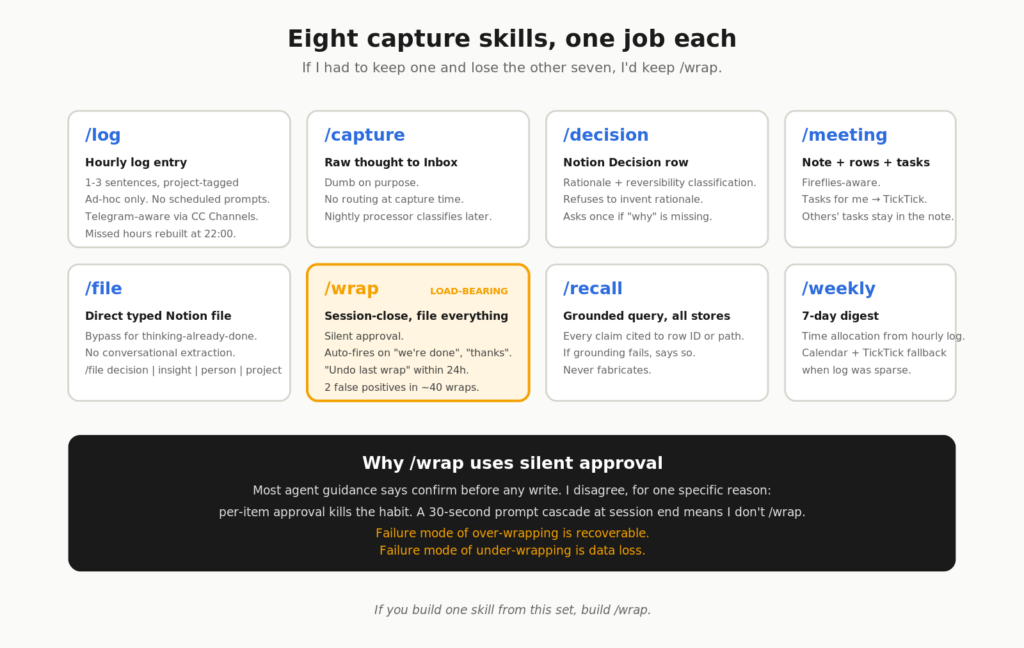
It’s eight skills, a trigger model with three rails of coverage, seven scheduled jobs, and one Cowork dashboard. The whole thing took about three weekends. Most of it is Claude Code plugin skills and one MCP scheduled-tasks config. No custom infrastructure.
Eight skills, one job each
Capture is a habit problem, not a tooling problem. The trick is making the friction-per-capture so low that the habit survives a bad week.
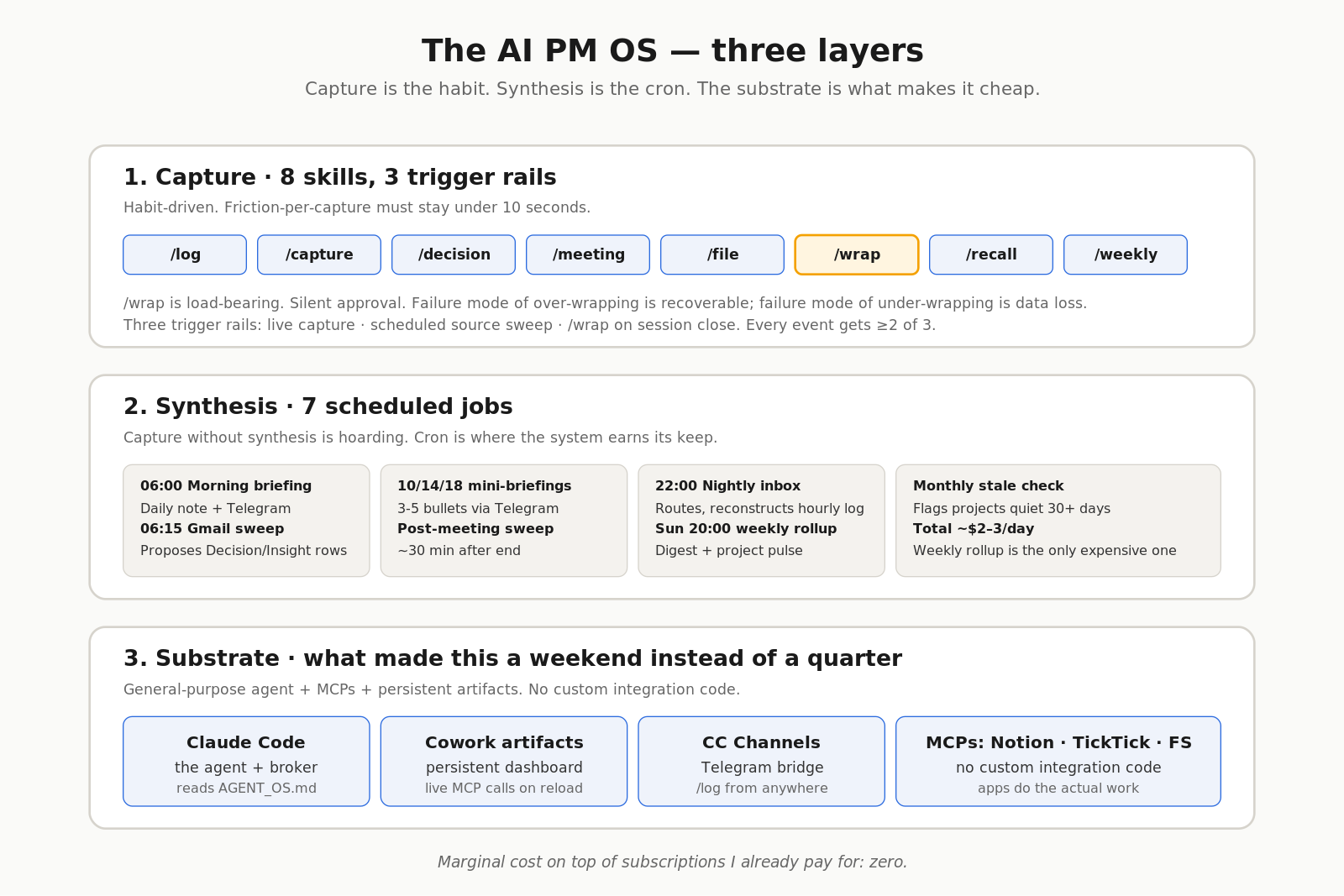
I have eight skills, installed as a single Claude Code plugin. Each one maps to a slash command and a single, narrow job. The one in bold is the load-bearing one — if I had to keep one and lose the other seven, I’d keep it.
| Skill | Job | Key design choice |
|---|---|---|
/log | Append a 1-3 sentence “what just happened” entry to today’s hourly log | Ad-hoc only, no scheduled prompts. Telegram-aware. Missed hours get reconstructed at 22:00 from calendar + TickTick + chat. |
/capture | Dump a raw thought to today’s Inbox | Dumb on purpose — no routing at capture time. The nightly processor classifies later. |
/decision | File a structured Decision row to Notion with rationale and reversibility | Refuses to invent rationale. If I say “we’re going with X” without why, the skill asks once. |
/meeting | Obsidian meeting note + Decision/Insight rows + TickTick tasks for next steps | Fireflies-aware. Tasks for other owners stay in the meeting file — we don’t write into other people’s systems. |
/file | Direct typed Notion file (decision / insight / person / project) | Bypass for when I’ve already done the thinking and just want the row written. No extraction. |
/wrap | Session-close — scan the conversation, file everything to the right place, report back | Silent approval. Auto-fires on session-end phrases. “Undo last wrap” within 24h. |
/recall | Grounded query across Notion + Obsidian + TickTick | Every claim cited to a row ID or file path. If grounding fails, says so. Never fabricates. |
/weekly | 7-day digest written to Areas/Weekly/YYYY-Www.md | Computes time allocation from the hourly log. Falls back to calendar + TickTick when the log was sparse. |
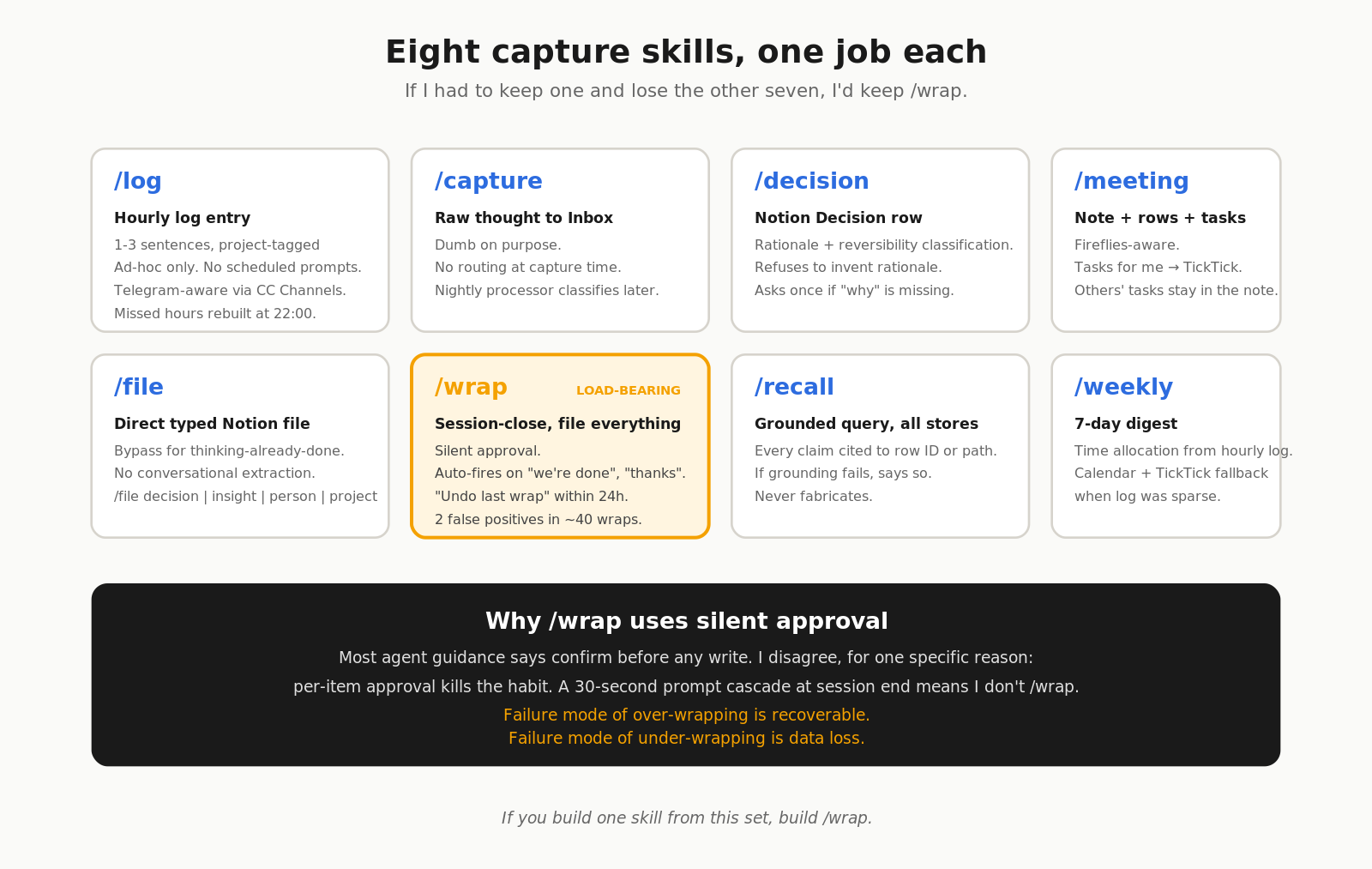
/wrap is the one that holds it together
Most personal knowledge systems die the same way. You capture for a month, you stop wrapping things up at the end of sessions, and three weeks later you have a folder full of half-formed notes and no idea what’s filed, what’s pending, and what you’ve already decided. The system silently calcifies.
/wrap solves this by running on the residue of any conversation. At session end — when I type “we’re done” or “thanks, let’s wrap” or just “ok bye” — the skill scans the chat for decisions made, insights captured, people mentioned, next-step tasks, and files them all. Silently. No per-item approval cascade.
Silent approval is the controversial choice. Most AI-agent guidance says you should confirm before any write. I disagree, sharply, for one specific reason: per-item approval kills the habit. If /wrap triggers a 30-second prompt cascade — “file this decision? Y/N. Add this insight? Y/N.” — I will not wrap, and the system rots. The failure mode of over-wrapping is recoverable; the failure mode of under-wrapping is data loss.
The safety net is “undo last wrap” within 24 hours. If Claude got something wrong, I can roll it back the next morning. In four weeks of use I’ve used it twice. Both times the row was wrong, not the skill — Claude had filed something I’d thought-out-loud-and-rejected as a decision. Two false positives in ~40 wraps is well inside my tolerance.
If you build one skill of this set, build /wrap. The rest are nice. This one is load-bearing.
Three rails, one truth: nothing falls through
Every captured event has at least two of three triggers covering it. Belt-and-suspenders by design.
- Live capture — I explicitly invoke a skill (
/log,/decision,/capture, etc.). Highest fidelity. Requires habit. - Source sweep — a scheduled job reads a source I didn’t explicitly mention (Gmail, Fireflies, calendar, TickTick completions). Catches what I forgot.
- Session close —
/wrapat the end of any conversation. Picks up the residue.
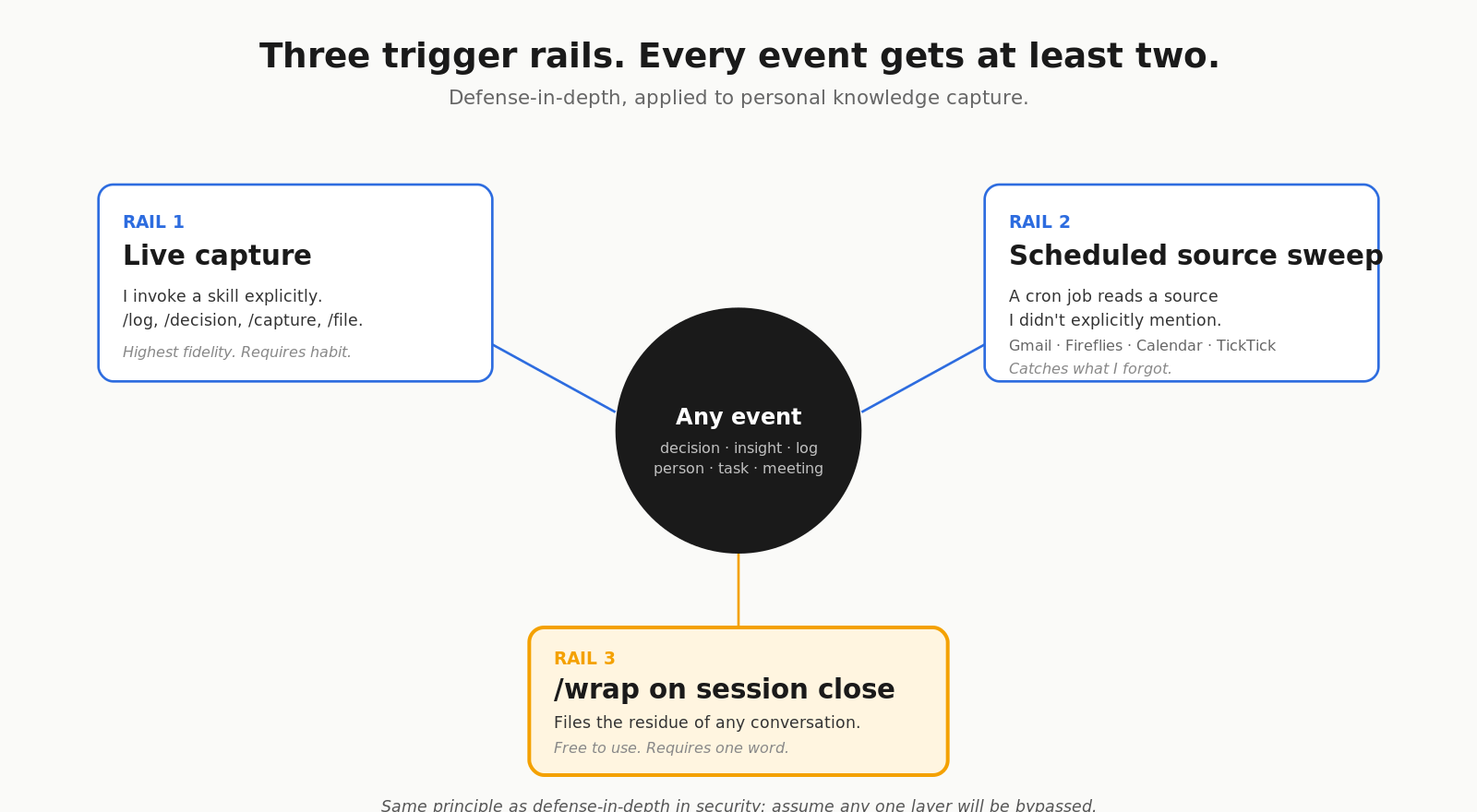
The redundancy is the trick. Single-trigger systems are fragile — one bad week and you have holes. With three rails, any single rail going dark for a few days is recoverable from the other two. The hourly log on a busy day might be sparse, but the nightly sweep reconstructs it from calendar + TickTick. The meeting I forgot to summarise gets caught by the Fireflies post-meeting sweep. The decision I made in chat but didn’t file gets caught by /wrap.
This is the most-borrowed and least-discussed idea in the system, so I’ll call out where I took it from: it’s the same principle as defense-in-depth in security — assume any one layer will be bypassed, design for the redundancy to catch it. Old idea, new domain.
/log from anywhere: Claude Code Channels + Telegram
The biggest gap in most personal knowledge systems is the moment of capture when you’re not at your desk. I solved it with Anthropic’s Claude Code Channels — the Telegram-bridge feature that lets a bot forward messages into a running Claude Code session.
Here’s the flow:
Phone (Telegram)            Cowork session             Vault + Notion
─────────────────          ────────────────           ──────────────
Send: "/log just            Channels MCP receives,    Claude resolves date,
finished pricing  ───────►  forwards to running  ────► infers project from
review with Sarah"          Claude session              recent context.

                                                       Appends to
                                                       Areas/Daily/
                                                       2026-05-30.md
                                                       under ## Hourly Log

See: "Logged    ◄────────── Reply: "Logged 14:00 ◄──── Confirmation
14:00 →
[[Onboarding              → [[Onboarding
Redesign]]"                 Redesign]]"
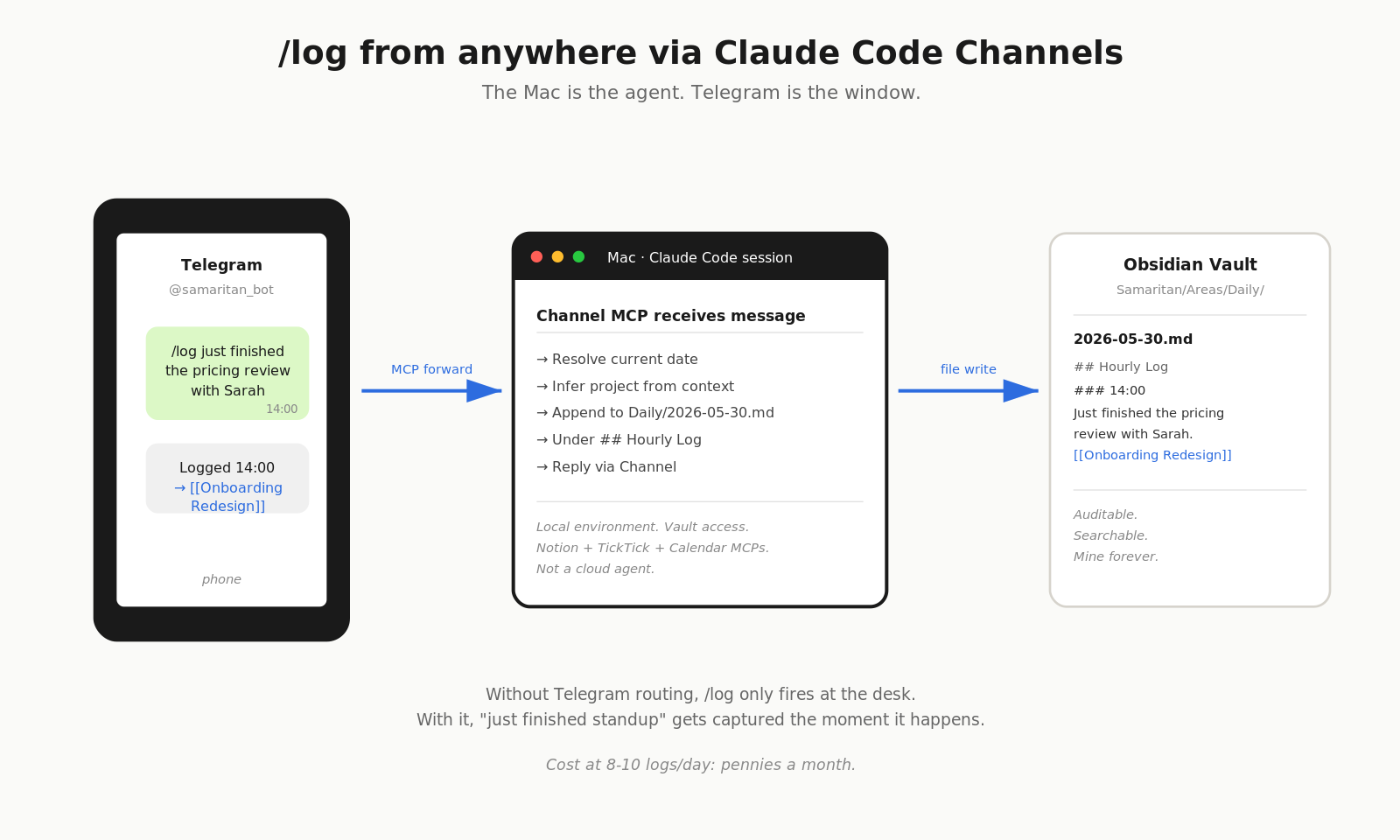
The Telegram bot is an MCP server. When I message the bot, it forwards into the Claude Code session running on my Mac. Claude processes it with the session’s full local environment — vault access, Notion, TickTick, calendar. It’s not a cloud-hosted agent. The Mac is the agent. Telegram is just a window into it.
Why this matters for the hourly log specifically: the hourly log is the highest-fidelity signal in the system, granular enough to reconstruct what actually happened in a week, sparse enough to be maintainable. Without Telegram routing, /log would only fire when I’m at my desk — which means lunch hours and afternoon meetings get logged as a clump or not at all. With Telegram routing, “just finished standup” gets captured the moment it happens.
The nightly inbox processor at 22:00 handles the days I forget entirely. Claude reads calendar + TickTick completions + chat history and proposes draft entries for missed hours. I approve them in the morning. Telegram + nightly reconstruction is what makes the hourly log a survivable habit instead of a six-week experiment.
Cost: at eight to ten logs per day, the Telegram traffic is pennies a month.
Seven scheduled jobs that turn capture into thinking
Capture without synthesis is hoarding. The cron jobs are where the system earns its keep.
| Job | When | What it does |
|---|---|---|
| Morning briefing | 06:00 daily | Reads yesterday’s daily note + today’s calendar + open Decisions + last 24h Gmail. Writes briefing to today’s daily note + Telegram. |
| Gmail inbox sweep | 06:15 daily | Identifies new threads naming Projects or containing decision language. Proposes Decision/Insight rows. |
| Mini-briefings | 10:00, 14:00, 18:00 | 3-5 bullets to Telegram. What changed, what’s next. Skips if nothing changed. |
| Post-meeting sweep | ~30 min after each meeting | Pulls latest Fireflies transcript, runs the /meeting flow automatically. |
| Nightly inbox processor | 22:00 daily | Routes inbox items, reconstructs missed hourly logs from calendar + TickTick + chat. |
| Weekly rollup | Sunday 20:00 | Writes weekly digest + runs Project pulse pass (status updates, stalled flags). |
| Stale check | 1st of each month | Flags Projects with no activity in 30 days. Proposes Archive moves — never auto-archives. |
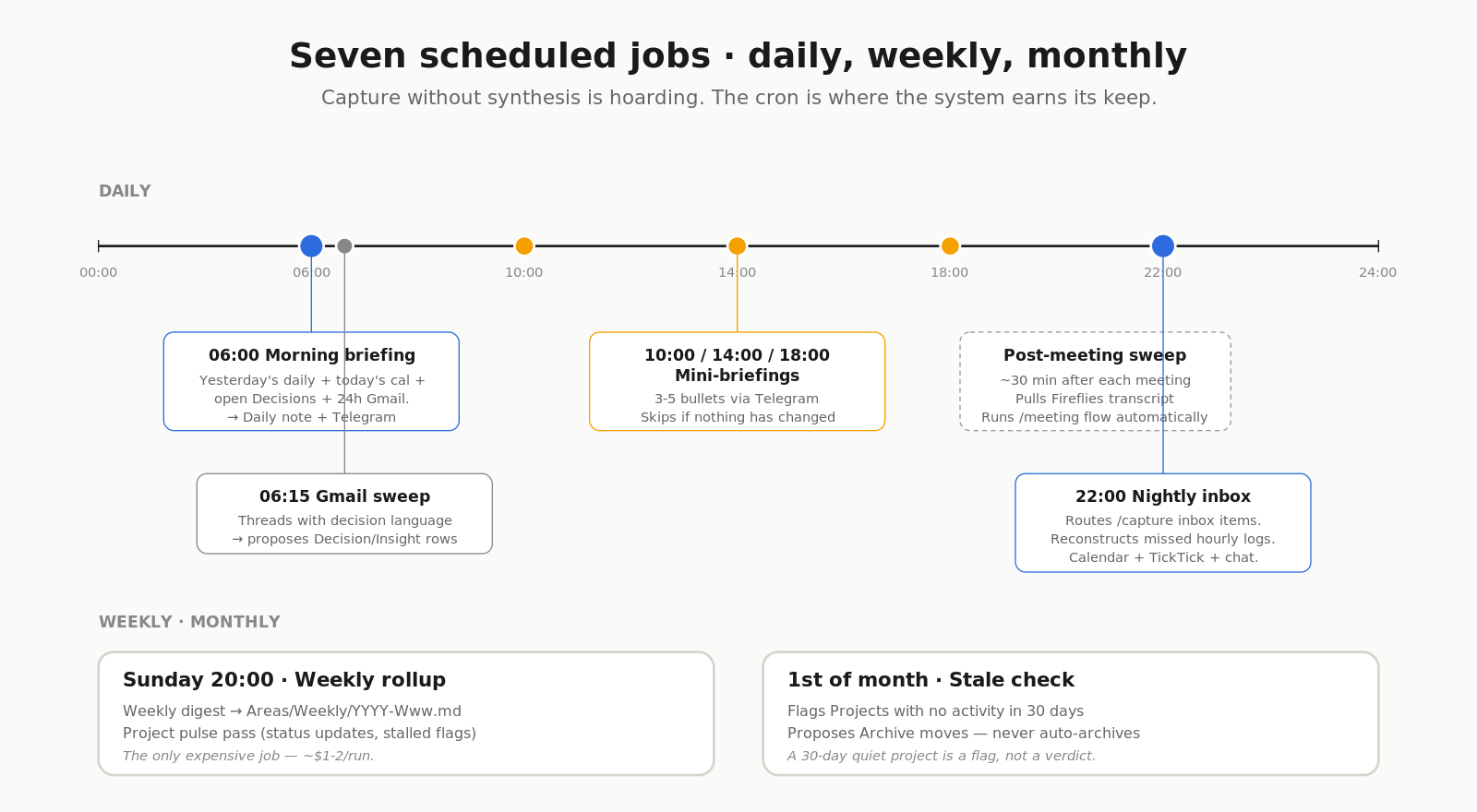
A few details that matter more than they look:
The morning briefing goes to both Obsidian and Telegram on purpose. Obsidian holds the full briefing in today’s daily note (auditable, history). Telegram pushes a condensed version (glanceable). Mini-briefings are Telegram-only — they’re meant to be ephemeral.
The mini-briefings skip when nothing has changed. This is the difference between a useful nudge and a notification you mute after two days. If three hours go by and no decisions were made, no meetings happened, no new tasks landed, the 14:00 ping just doesn’t fire.
The stale check proposes archive moves, never auto-archives. A 30-day quiet project is a flag, not a verdict. Often that’s a backburner thing I’m still going to ship. The system raises its hand; I decide.
Token cost across all jobs runs maybe $2-3 per day. The weekly rollup is the only one that’s even close to expensive, and it’s worth its weight three times over.
The dashboard, in one frame
The morning answer to “what’s the state of my world right now” used to take three tabs. Now it’s one Cowork artifact.
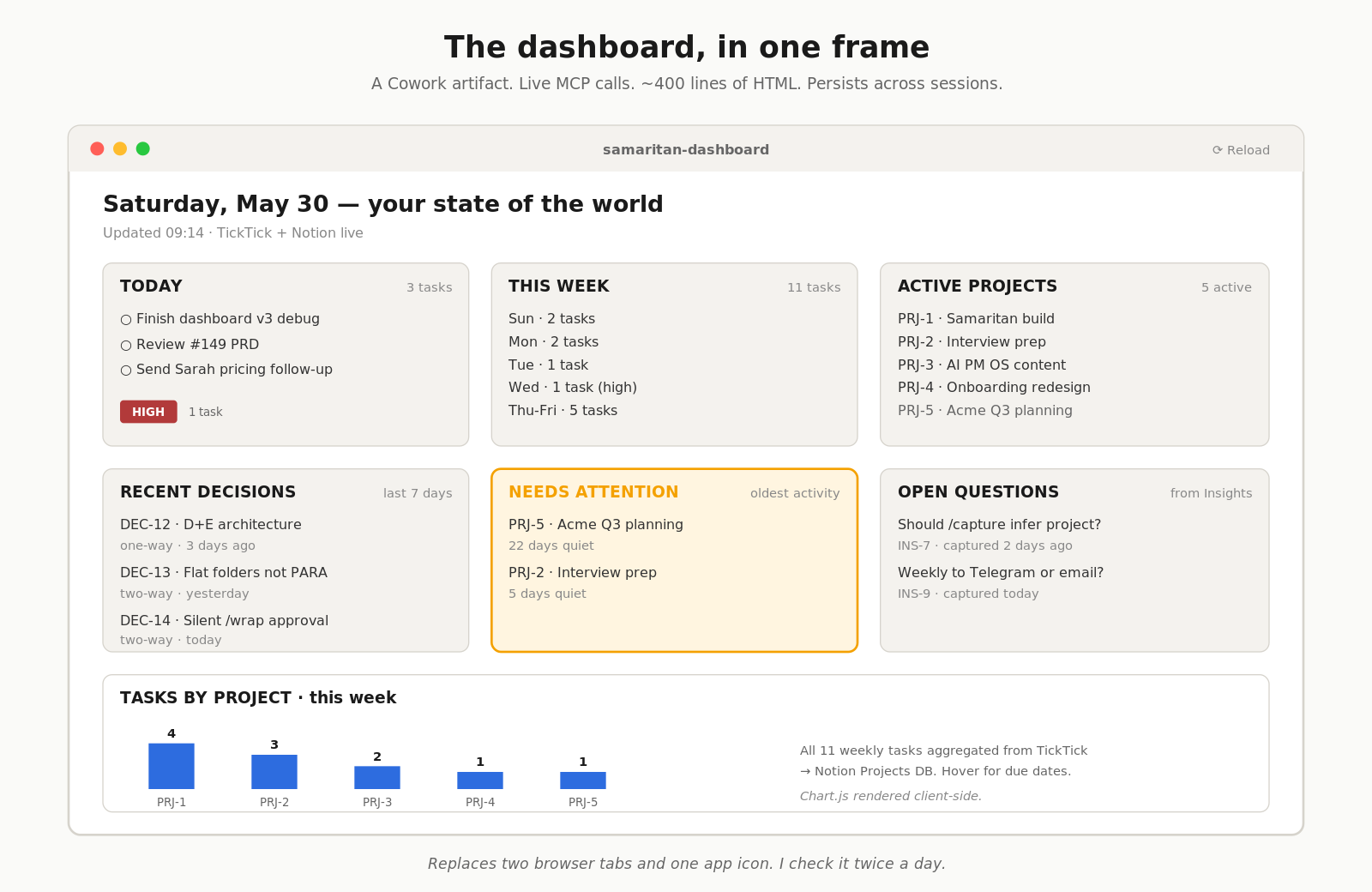
It pulls live from TickTick (today’s tasks, this week’s tasks, distribution by project) and Notion (active projects, recent decisions, projects needing attention, open questions). One HTML file, ~400 lines, three whitelisted CDN scripts. Persists across sessions. Reloads pull fresh data.
I look at it twice a day — first thing in the morning and around 5pm before I close out. It has replaced two browser tabs and one app icon.
This is also where the build had its longest debugging arc. The Cowork artifact sandbox returns MCP responses wrapped in the MCP Content protocol envelope, not raw — {content: [{type: "text", text: "<json string>"}]}. Every call appeared to succeed but every data array came back empty. Three iterations to figure out that I needed a defensive unwrap that JSON-parses the inner text. Lesson kept for next time.
Three files, one contract
The system is contract-driven. Claude reads a small, explicit set of routing rules at session start and behaves according to them — instead of re-deriving where things go each time.
Three files, three different readers:
- CLAUDE.md — 1-page orientation. Loaded into every Claude Code session start.
- AGENT_OS.md — the full operating contract. Routing rules, scheduled jobs, Notion data source IDs. Capped at 3 pages — a manual longer than that is a sign the system is too complex.
- README.md — human cheat sheet. I read this. I never read the contract.
Splitting by reader and cadence keeps each one tight. CLAUDE.md changes monthly. AGENT_OS.md changes when a routing rule changes. README.md changes when I need a reminder of my own conventions.
What this is sitting on
Three substrate pieces did most of the heavy lifting:
- Claude Code — the agent layer. The reason this took weekends instead of a quarter is that the broker isn’t custom-coded glue, it’s a general-purpose AI assistant reading a contract file.
- Cowork artifacts — persistent HTML pages with MCP access. The dashboard wouldn’t exist without this; it’s the only surface that sees Notion + TickTick + (eventually) Calendar in one frame and survives session restarts.
- Claude Code Channels — the Telegram bridge. Without it,
/logonly fires at the desk. With it, the moment of capture is anywhere I have my phone.
Honest credit to the apps doing the actual work — TickTick for tasks, Notion for the structured store, Obsidian for the prose store. Claude is the broker. They’re the substrate.
What it costs and what it doesn’t
Real costs:
- Anthropic API usage for Claude Code: I’m on Claude Max, no marginal cost
- Notion: paid plan, $10/month, would have it anyway
- TickTick: premium, $3/month, would have it anyway
- Obsidian: free
- Cowork plugin: free
- Telegram bot: free
Total marginal cost of running this system on top of subscriptions I already pay for: zero.
What it doesn’t cost: time I don’t have. The capture skills are 5-10 seconds each. /wrap is 30 seconds at session end and saves me 10 minutes of “wait, where did I put that” the next morning. Net positive every day.
What’s not built yet, honestly
I’m posting this at four weeks of use, not four years. Two things are designed but not running:
- The seven scheduled jobs exist as specs in
AGENT_OS.md. I have not wired them up via the scheduled-tasks MCP yet. The morning briefing and weekly rollup are the next concrete build step. - The Telegram Claude Code Channels bot is designed. Not configured yet.
/logfrom the desk works;/logfrom the phone is the next milestone.
The reason I’m publishing anyway is that the architecture is the part worth sharing. The wiring is a weekend.
Credit where it’s due
- Anthropic for Claude Code, Cowork, and Claude Code Channels. The substrate that made this buildable in weekends. Three months ago I would have written custom integrations for each app; today the agent layer is general-purpose and the integrations are MCPs.
- TickTick, Notion, Obsidian — the apps doing the actual work. Claude is the broker. They’re the substrate underneath.
- Tiago Forte — the PARA vocabulary I’m still using. Building a Second Brain is in the bibliography for the architecture-level post that precedes this one.
- The Claude Code + Obsidian writers on Medium and Substack — the running conversation that made this feel like a viable build path rather than a frontier experiment.
Try it. Tell me what breaks.
The plugin, the AGENT_OS.md contract, the four Obsidian templates, the Cowork dashboard, and these three blog posts as docs are all in the repo: github.com/devsandip/samaritan. Fork it, gut it, adapt it — that’s the point of shipping it open.
What I most want is failure reports. The skills are deterministic — they file or they don’t — but the routing logic in AGENT_OS.md is opinionated and the opinions are mine. If your work shape doesn’t fit, I want to know which contract assumption broke.
If you’ve built something in this space and it survived more than three months of real use, I’d love to hear what you kept and what you cut.