A PM Building a Second Brain: Why I Skipped the Vector DB and Picked Claude + Notion + Obsidian
I’ve been using Claude Code as my main interface for about six months now. I build with it, I run my day through it, I apply for jobs with it, I prep for system design interviews with it. Four different jobs, one tool, sometimes inside the same hour.
Two patterns kept showing up.
The first was repeat work. I’d have the same conversation twice in a week — about a decision I’d already made, a person I’d already met, a tradeoff I’d already worked through — because Claude didn’t remember and I didn’t have anywhere durable to put it. The second was lost context. Every new session started cold. Every fresh window was a clean slate. The “ChatGPT but for me” promise of personalised memory was still mostly a promise.
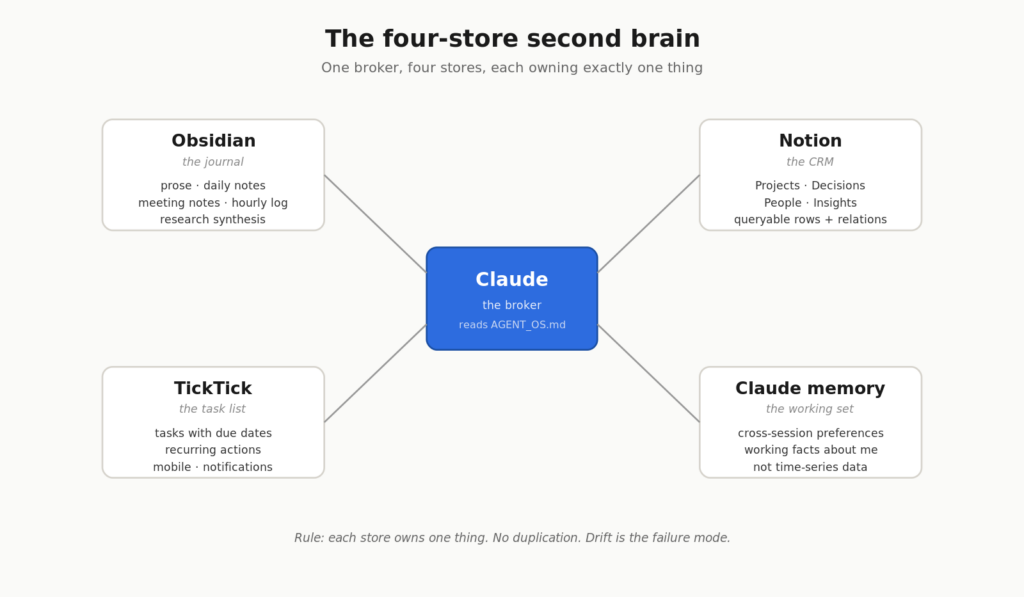
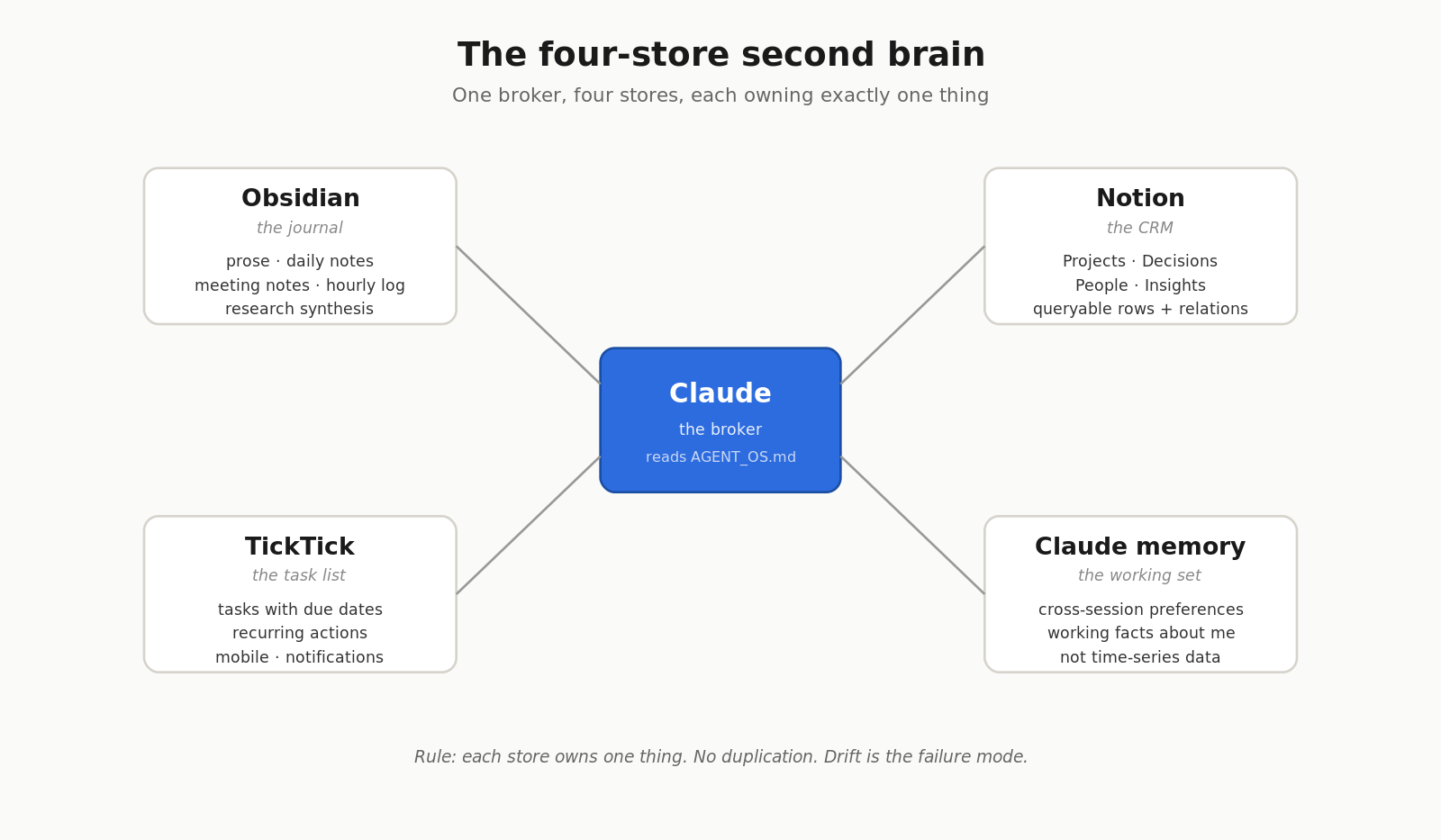
So I built a second brain. Not the “weekend vector database” version. A real one — capture, store, retrieve, synthesise — with Claude as the broker between three apps I already used. I’m a Person of Interest fan, so I called it Samaritan. The joke being: this one only watches one person on purpose — me. Repo: github.com/devsandip/samaritan.
This is the writeup of how I chose the architecture, what I rejected, and why.
The five architectures I considered
Before building anything, I spent a weekend mapping out what other people had already done. The Personal Knowledge Management space is crowded — Tiago Forte’s PARA and Building a Second Brain are the canonical reference, Brian Petro’s Smart Connections is the Obsidian-native semantic search plugin, Khoj.dev (YC W24) is the self-hosted-AI-second-brain option, and there’s a growing Claude Code + Obsidian writer ecosystem on Medium and Substack publishing every variant of “I plugged Claude into my notes.”
I scored five plausible architectures on five axes: ease of build, fit for PM work, novelty, external dependencies, and token cost.
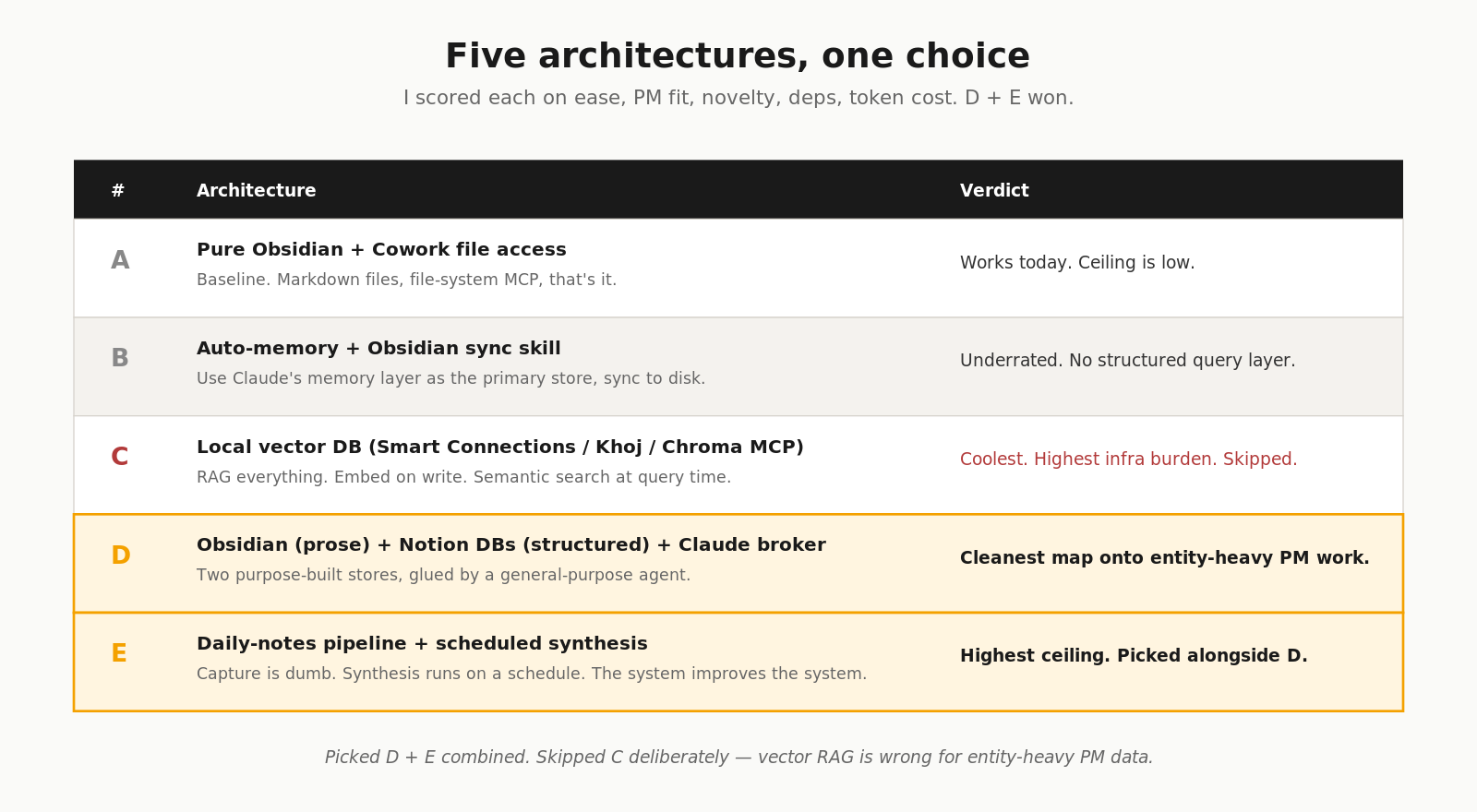
| # | Architecture | Verdict |
|---|---|---|
| A | Pure Obsidian + Cowork file access | Baseline. Works today. Ceiling is low. |
| B | Auto-memory + Obsidian sync skill | Underrated. Flashy enough that no one writes about it. |
| C | Local vector DB (Smart Connections / Khoj / custom Chroma MCP) | Coolest. Highest infrastructure burden. |
| D | Obsidian (prose) + Notion DBs (structured) + Claude broker | Cleanest map onto entity-heavy PM work. |
| E | Daily-notes pipeline + scheduled synthesis | Highest ceiling. The system improves the system. |
I picked D + E combined. Notion gives me the structured backbone PM work actually needs — projects, decisions, people, insights as queryable rows. Scheduled synthesis converts captured signal into thinking. Obsidian holds the prose. Claude brokers between them.
I skipped C — the vector database route — deliberately. That decision deserves its own section, because it’s the one most people get wrong.
Why I skipped the vector database
The default advice for “build yourself an AI second brain” right now is: install a vector database. Either Smart Connections inside Obsidian, or Khoj as a separate app, or roll your own Chroma + embedding model + MCP server. Retrieval-augmented generation is the standard pattern, and there’s a year of writing online telling you to do it.
For a PM’s note volume, it’s the wrong tool.
Two specific reasons. First, my notes are entity-heavy, not text-heavy. The things I actually need to retrieve are Decision DEC-12, Project Onboarding Redesign, Person Sarah at Acme — structured rows with relations. Vector similarity is a fuzzy text match. A Notion database query is an exact one. For “what did we decide about pricing last quarter?”, a structured query against a Decisions table beats a semantic search every time.
Second, the infrastructure cost is real and the benefit is speculative. A vector DB means embedding every note on write, hosting the index somewhere, keeping it in sync, and tuning chunk size and overlap until the recall feels reasonable. For a few thousand notes, that’s a weekend of setup and ongoing care. Structured retrieval — open the right Notion database, filter on a property, follow a relation — is one MCP call and instant.
The mechanism matters. Vector search is correct when your data is unstructured and your queries are about meaning. PM data is mostly structured and the queries are mostly about specific entities. Picking the right retrieval style is upstream of every other choice.
I’ll revisit if I ever hit a real recall problem. I haven’t yet.
The four-store ownership rule
Once I picked D + E, the hard part wasn’t picking tools. It was deciding what lived where, and refusing to duplicate. Every “AI second brain” failure I’ve seen comes from the same place: the same fact gets written into two stores, they drift, and now you don’t know which one is true.
So I wrote an ownership rule. Each store owns one thing. No overlap.
| Store | Owns | Does NOT own |
|---|---|---|
| Obsidian | Prose, drafts, meeting notes, daily notes, hourly log, research synthesis | Structured rows, tasks |
| Notion | Projects, Decisions, People, Insights — queryable rows with relations | Long-form writing, drafts |
| TickTick | Tasks with due dates, recurring actions, next-steps owned by me | Notes, decisions, references |
| Claude memory | Cross-session preferences, working facts about me | Time-series data, anything queryable |
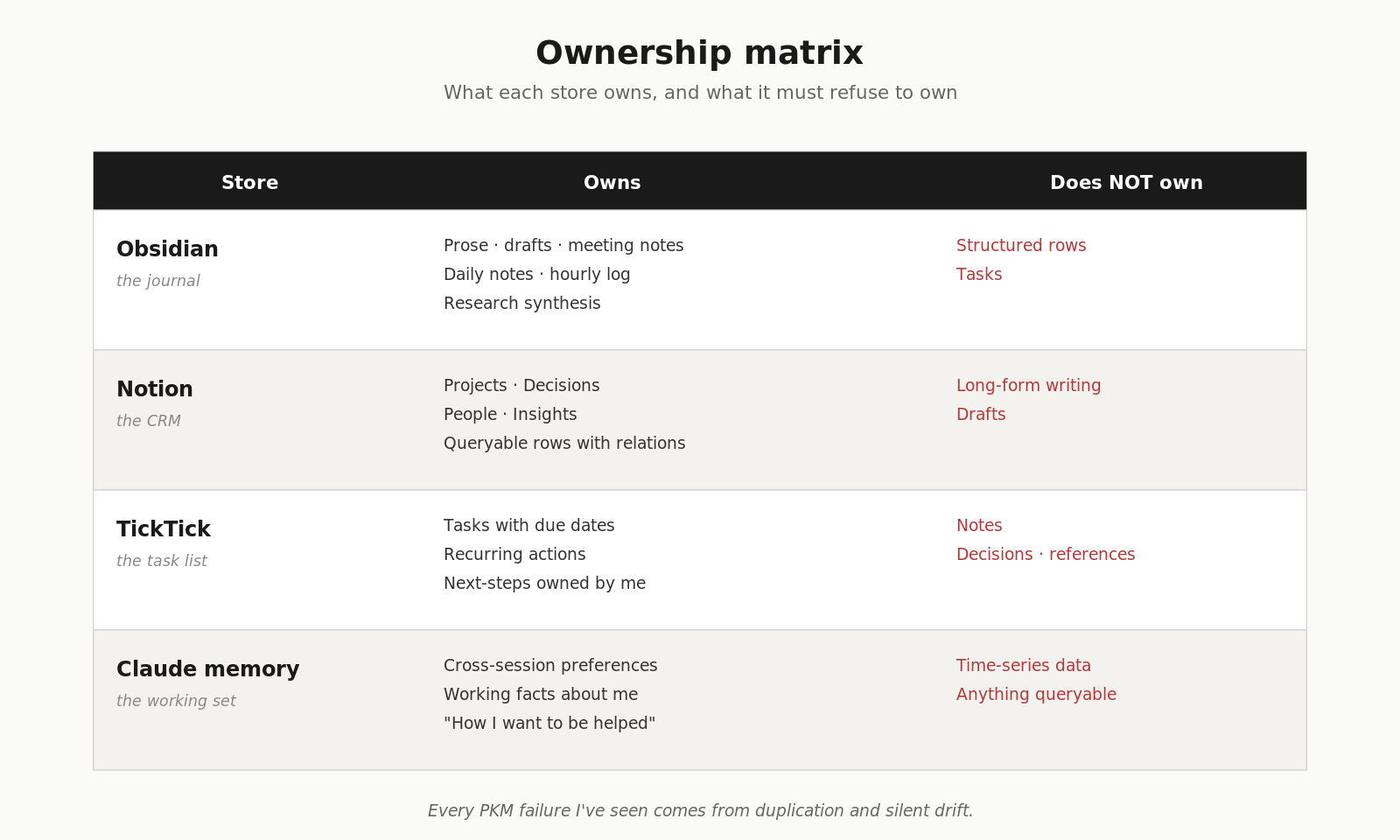
The mental model that holds it together: Obsidian is the journal, Notion is the CRM, TickTick is the task list. Together they feel like one system. Claude is what makes them feel that way.
The TickTick separation is the one people argue with most. “Just use Notion for tasks.” No. TickTick is purpose-built for tasks — mobile-first, recurring, notifications, swipe-to-complete. Replicating that inside Notion would be worse on every dimension. The cost of a third store is one ID mapping inside the Notion Projects row. That’s it.
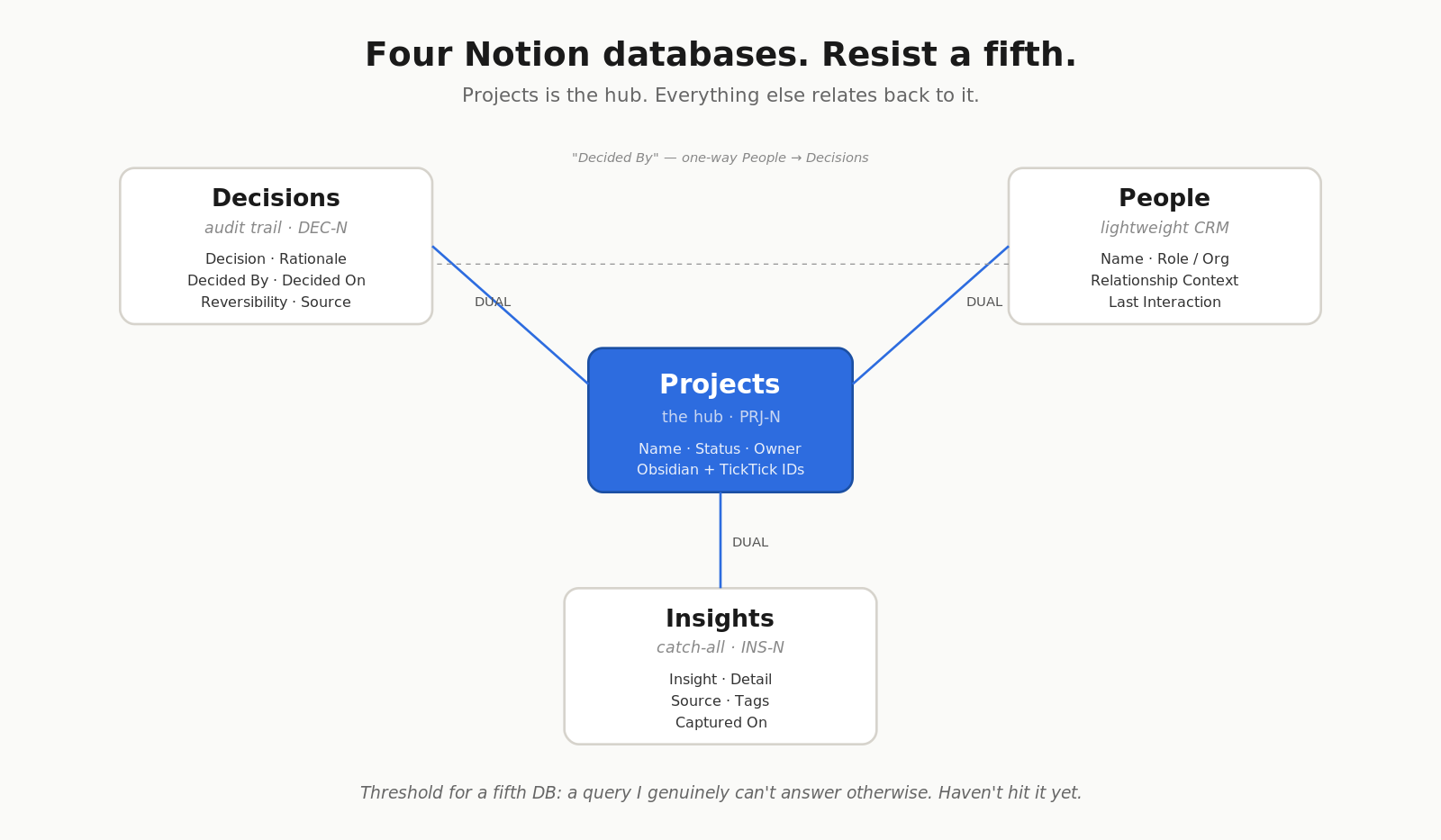
Four Notion databases, and a rule for resisting a fifth
Most PM second-brain templates accumulate databases. Tasks, notes, areas, goals, OKRs, weekly reviews, monthly reviews. Each extra database doubles routing complexity — every capture moment becomes a “which one of these does this go in?” question, and that’s the question that kills the habit.
I held to four:
- Projects (hub — everything relates back here)
- Decisions (audit trail — what was decided, why, by whom, reversible or not)
- People (lightweight CRM — name, role, last interaction, related projects)
- Insights (catch-all reference for everything else worth keeping)
Tasks live in TickTick. Areas live as flat folders and tags in Obsidian.
The threshold for adding a fifth: a query I genuinely can’t answer otherwise. Not “it would be nice to have.” Not “Notion has a template for it.” A real, repeated, unanswerable query. I haven’t hit it yet.
Flat folders, not nested PARA
Tiago Forte’s PARA — Projects, Areas, Resources, Archives — is the most-cited filing system in the personal knowledge management world. I use it. With one departure from the canonical version: I keep folders flat.
PARA’s strict mutual exclusivity rule — every note lives in exactly one of the four categories, and you move it as its status changes — is a paper-folder constraint. It came from an era when a note physically had to be in one drawer. Obsidian’s wikilinks and tags carry multi-belonging natively. A note can live in Projects/Onboarding/ and still be linked from three project pages, two area pages, and a daily note. Folders represent “where I’m acting on this.” Tags and links represent “what this relates to.”
The win: when an AI is reading your vault, multi-belonging is what lets it answer cross-cutting questions. “What did I work on last month that touched onboarding?” doesn’t require a folder hierarchy. It requires links and tags. The folder is just the parking spot.
I’m not the first person to land here — every Obsidian power user eventually does — but I’m calling it out because PARA is so widely cited that the nested version still gets recommended, and it’s wrong for the LLM era.
What everything sits on
Three substrate choices made this buildable in a weekend instead of a quarter:
- Claude Code as the agent, with MCP servers for Notion, TickTick, and the filesystem. The fact that the broker layer is a general-purpose AI assistant — not a custom-coded integration — is what makes the system bend to my workflow instead of the other way around.
- Obsidian as the prose store. Markdown files on disk. Plain text. Mine forever, regardless of what happens to any company.
- Notion as the structured store. Worth the lock-in cost because the database UX is unmatched and the MCP is solid.
The combination is the point. Claude alone is amnesiac. Obsidian alone has no structured query layer. Notion alone has no prose ergonomics. Glue them together with an opinionated broker and you get a second brain that does what no single one of them can.
What I’m crediting
A few people whose thinking I borrowed from while building this:
- Tiago Forte — Building a Second Brain and the PARA framework. The vocabulary I disagree with on nested folders is still the vocabulary I’m disagreeing in.
- Brian Petro — Smart Connections, the Obsidian semantic-search plugin. The reason I felt comfortable skipping a separate vector DB was knowing this existed if I ever needed it inside Obsidian.
- Khoj.dev (YC W24) — the self-hosted-AI-second-brain option I considered and rejected. The fact that the rejection felt informed instead of defaulted is because their writeups are clear about what they do and don’t do.
- The Claude Code + Obsidian writers on Medium and Substack — the running thread that established this was a viable build at all. I’m one more voice in that conversation, not the first.
What this is the foundation for
This post covers the architecture. The substrate. The decisions that determine what’s possible on top.
The operational layer — the eight skills I invoke from my phone or my desk to capture things, the trigger model that makes sure nothing falls through, the scheduled jobs that turn captured signal into Sunday-evening synthesis, the dashboard I look at every morning — is a separate post. Coming next.
Repo: github.com/devsandip/samaritan. Plugin, contract, templates, the Cowork dashboard, and these blog posts as docs. Fork it, gut it, adapt it — that’s the point of shipping it open.
If you’ve built something in this space, especially a version of it that survived more than three months of real use, I’d love to hear what you kept and what you cut. The fail mode of a personal knowledge system is silent — you stop using it, you don’t notice for a while, the data calcifies, and then you’re back to ChatGPT amnesia. What kept yours alive?